Home > Blog >
How to Convert 2D Image to 3D Model: Top 6 Ways

How to Convert 2D Image to 3D Model: Top 6 Ways

Let's get straight to the point. For most people, AI image-to-3D generators like Tripo and Meshy are the fastest option. Their free versions can generate a printable 3D model from a single image in about a minute. ImageToSTL is another option we recommend. It's free to use online and doesn't require registration. Tinkercad is more beginner-friendly for children and first-time users, while Blender and ZBrush are better suited to users who want professional-grade modeling tools and more control over the details.

Convert 2D Image to 3D Model: Quick Comparison

There are many ways to convert a 2D image into a 3D model. Choose a method based on your needs and consider what matters most to you: cost, ease of use, conversion quality, or the time it takes. I recommend starting with the simplest and fastest method, then working your way up to more advanced options.

Method Features Difficulty Cost (Free / Paid) Time
Tripo AI, Meshy AI image to 3D generator Easy Free tier / Paid plans 1 to 5 minutes
ImageToSTL Online converter, no sign up Very easy Free Under 2 minutes
Blender Professional software Hard Free 1 hour plus
Tinkercad Beginner-friendly Easy Free (account required) 10 to 20 minutes
ZBrush More powerful, professional software Very hard Paid Several hours
ItsLitho Best for Lithophane maker Easy Free 5 to 10 minutes

Convert 2D Image to 3D Model with AI

When you convert 2D image to 3D model with AI, a neural network studies your picture, predicts the depth and the hidden back side of the subject, and builds a textured 3D mesh around that guess. The technology improved dramatically in the last two years, and it is now the most practical starting point for characters, animals, cartoon figures, and toy concepts.

Tripo AI is the strongest free option right now. Upload a JPG or PNG, click generate, and you get a previewable 3D model in about a minute. The free tier provides enough monthly credits to test several images, and exports include STL, OBJ, and GLB, which covers both 3D printing and game engines. Meshy works the same way with a comparable free credit system and clean mesh exports.

How to do it:

  1. Open Tripo AI or Meshy in your browser and choose the image to 3D mode.
  2. Upload a clear, well-lit picture with a single subject and a simple background.
  3. Generate the model, then rotate the preview to check the back side and thin areas.
  4. Export as STL for printing or GLB for digital use.

Watch out for: AI models sometimes need minor cleanup before printing, especially around thin parts like arms or tails. Busy backgrounds confuse the depth prediction, so crop your image first. This method produces a true full 3D model, which is its biggest advantage over the free online converters below.

Convert 2D Image to 3D Online Free No Sign Up Options

Sometimes you just want a fast result with zero friction: no account, no email, no watermark. That is exactly the job for browser converters, and ImageToSTL is the most dependable of them. You can convert 2D image to 3D online free no sign up required, and the whole process takes under two minutes.

How it works: the tool reads your image as a heightmap. Light areas rise, dark areas sink, and the output is a relief style 3D model you download as an STL file. Upload your image, adjust the depth and smoothing sliders, preview, and download.

Best results come from:

  • High-contrast black and white logos and silhouettes
  • Simple icons, symbols, and line drawings
  • Images with clear edges and minimal shading

The limitation is real and worth knowing upfront: a heightmap converter produces a relief, not a fully rounded 3D object. The back of the model is flat. For plaques, stamps, cookie cutters, and embossed keychains this is perfect. For a figurine that looks right from every angle, use the AI method above.

Convert 2D Image to 3D Model Software for Desktop

Online tools trade control for convenience. When you need to edit geometry, fix problem areas, or prepare a model for animation, desktop convert 2D image to 3D model software is the answer, and the best option costs nothing.

2D Image to 3D Model Free Download: Blender

Blender is the most capable 2D image to 3D model free download available, period. It runs on Windows, Mac, and Linux, and it handles every workflow in this article. Two approaches matter for beginners:

  1. SVG import and extrude. Convert your image to SVG first (free tools like Inkscape do this), import the SVG into Blender, and extrude the flat curves into a solid object. This is ideal for logos and bold line art.
  2. Displacement heightmap. Apply your image as a displacement texture on a subdivided plane to raise a detailed relief, then solidify and export. This mimics the online converters but with full control over resolution and depth.

The catch is the learning curve. Plan on an evening with a beginner tutorial before your first clean export. The payoff is that Blender can take you from a flat drawing all the way to a rigged, animated character, something no free online tool can do.

Tinkercad for Kids' Drawings and Line Art

Tinkercad is a free browser-based 3D design tool from Autodesk. It requires an account, but the workflow is beginner-friendly: import an SVG of a drawing, extrude it to a chosen thickness, combine it with basic shapes, and export an STL. It is the fastest way to turn a child's outline drawing into a real object, and it appears in our guide to 3D modeling software for kids for exactly that reason.

ZBrush

For professional production work, paid software like ZBrush offers sculpting brushes and image alpha workflows that go far beyond anything listed here. Most home users and hobbyists never need it.

Convert 2D Image to 3D STL Files with a Lithophane Maker

A lithophane is a printed panel where thicker areas block light and thinner areas let it through, so a photo appears when you hold the print up to a lamp or window. It is one of the most impressive gifts you can make from a family photo, and it is also the easiest way to convert 2D image to 3D STL format for free.

ItsLitho is the go-to free tool. Upload a photo, pick a shape (flat panel, curved arc, heart, or sphere), tune the thickness settings, and download the STL. Five to ten minutes of work, no account, no cost.

Tips for a great lithophane:

  1. Choose a photo with strong contrast and a clear subject.
  2. Increase the contrast slider slightly beyond what looks natural on screen.
  3. Print in white PLA at 0.12 mm layer height for the finest detail.

Kids love seeing their own photos or drawings appear in glowing plastic, which makes this method a favorite for family 3D printing projects.

How to Convert 2D Image to 3D Model for 3D Printing

Whatever method you choose, the path from picture to printed object follows the same five steps. To convert 2D image to 3D model for 3D printing, work through them in order:

  1. Generate the model with any method above and export it as STL or OBJ.
  2. Check the mesh. Make sure the model is watertight (manifold) with no holes. Free tools like Meshmixer or the repair function in your slicer can fix common issues.
  3. Slice the file. Open the STL in slicing software such as Cura or your printer's own app, set layer height and infill, and export G-code.
  4. Print in PLA. PLA is forgiving, low odor, and the standard material for home and classroom printers.
  5. Finish if needed. Remove supports, sand rough edges, and paint for a polished result.

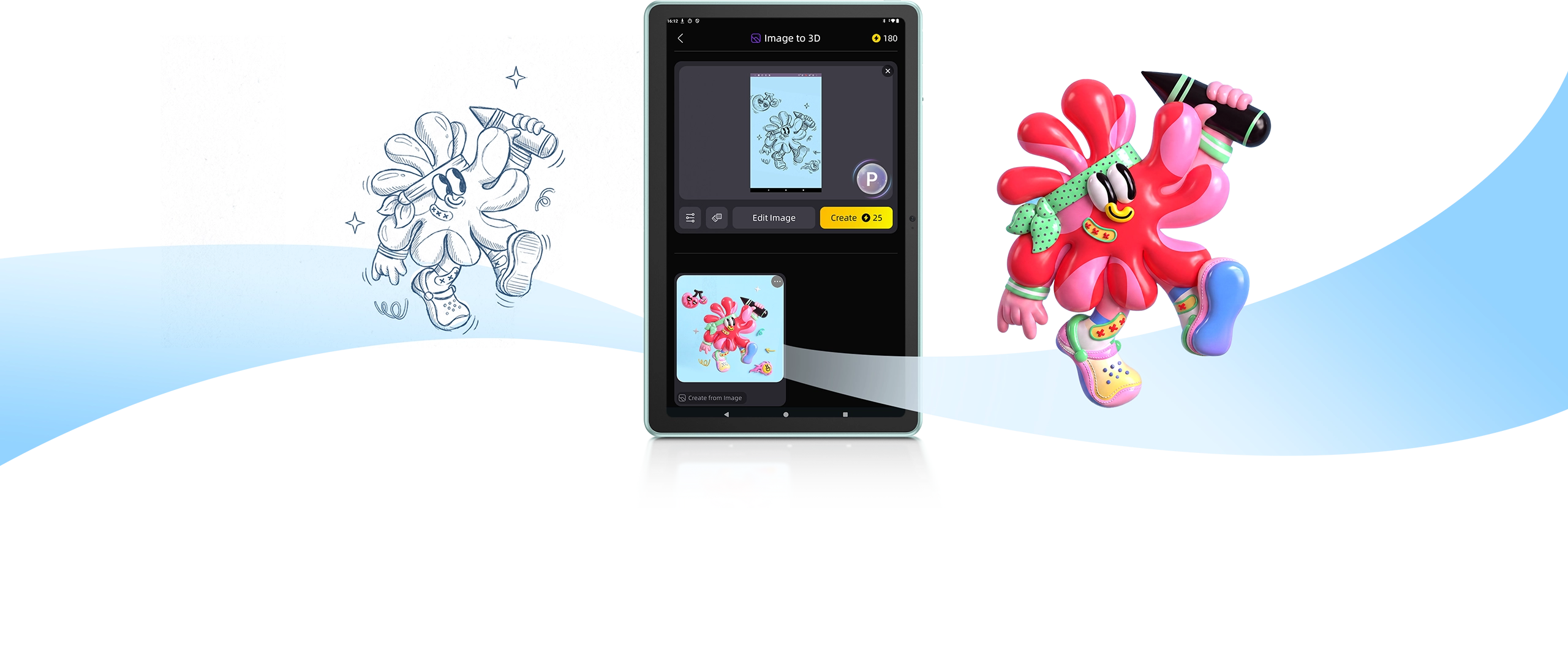
If you are doing this with kids, the ugee ArtPlay Pad ($399 early bird price as of September 2026) shortens the whole pipeline. Its deep Tripo AI integration turns a hand-drawn sketch into a fully rendered 3D model right on the pad, and a 1-month Tripo AI Pro subscription is included in the box. The 12-inch eye-care display, battery-free 16K-pressure U-Pencil Pro stylus, and lifetime ibisPaint K access make it a sensible all-in-one choice for young creators. You can see how it fits among other options in our best drawing tablet for beginners roundup, and pick up the fundamentals in our guide on how to use a drawing tablet.


ugee ArtPlay Pad using Tripo AI to turn a 2D sketch into a 3D model

Which Is the Best Free 2D to 3D Image Converter for Your Project?

There is no single winner, because the best free 2D to 3D image converter depends on your source image and end goal. Match your situation to one of these four scenarios:

  • A kid's drawing as a toy: run it through Tripo AI for a full 3D character, or trace it into Tinkercad for a simple extruded figure.
  • A logo or symbol as a physical object: ImageToSTL gives you a clean relief in under two minutes with no account.
  • A serious hobby or career skill: invest the time in Blender. Every hour you spend learning it pays back for years.

Start with the fastest free tool that fits your scenario, print a small test, and only reach for heavier software when you hit a real limitation. That approach keeps the fun in the process and the learning curve manageable.

Frequently Asked Questions

Can I convert a 2D image to a 3D model for free?

Yes. Every method in this guide has a free path. ImageToSTL and ItsLitho are completely free with no sign up, Tripo AI and Meshy offer free monthly credits, Tinkercad is free with an account, and Blender is free forever.

What file format do I need for 3D printing?

STL is the universal standard and every tool here exports it. OBJ also works with most slicers and preserves color information. GLB is better for digital uses like games and AR.

Can AI really turn one picture into a full 3D model?

Yes, with caveats. Modern AI generators predict the unseen sides of a subject surprisingly well for characters and objects with clear silhouettes. Complex mechanical parts and images with cluttered backgrounds still produce rough results that need manual cleanup.

Can I 3D print my child's drawing?

Absolutely, and it is one of the most rewarding family printing projects. Scan or photograph the drawing, run it through an AI generator or import it into Tinkercad as an SVG, slice, and print in PLA.

How long does the whole process take?

From image to sliced file, expect anywhere from two minutes with an online converter to an hour or more with desktop software. Printing time depends on model size, and a small figure typically takes one to three hours.

Conclusion

Now that you know there are many ways to convert a 2D image into a 3D model, you probably have a better idea of which method works best for you. You don’t have to get it right the first time. Exploring different methods can be part of the fun too. Hope you have a great day!

Regresar al blog

Deja un comentario

How to Convert 2D Image to 3D Model: Top 6 Ways

How to Convert 2D Image to 3D Model: Top 6 Ways

Let's get straight to the point. For most people, AI image-to-3D generators like Tripo and Meshy are the fastest option. Their free versions can generate a printable 3D model from...

Learn More

How to Convert 2D Image to 3D Model: Top 6 Ways

Let's get straight to the point. For most people, AI image-to-3D generators like Tripo and Meshy are the fastest option. Their free versions can generate a printable 3D model from...

Learn More
ugee ArtPlay Pad creative pad for youth with 2D-to-3D creative toolbox, 12 inch eye-care display and 16K EMR stylus

Best 3 Ways to Turn a Drawing Into a 3D Model

A good sketch should not have to stay flat on the page. If you have ever typed "turn drawing into 3D model" into a search bar, you already know the...

Learn More

Best 3 Ways to Turn a Drawing Into a 3D Model

A good sketch should not have to stay flat on the page. If you have ever typed "turn drawing into 3D model" into a search bar, you already know the...

Learn More
3D Printer Ideas for Kids: 30+ Fun & Easy Projects

3D Printer Ideas for Kids: 30+ Fun & Easy Projects

Looking for 3D printer ideas for kids that go beyond the same three test prints? You are in the right place. A kid-friendly 3D printer can turn a rainy afternoon...

Learn More

3D Printer Ideas for Kids: 30+ Fun & Easy Projects

Looking for 3D printer ideas for kids that go beyond the same three test prints? You are in the right place. A kid-friendly 3D printer can turn a rainy afternoon...

Learn More
10 Benefits of 3D Printing for Kids | STEM, Creativity & More

10 Benefits of 3D Printing for Kids | STEM, Cre...

If you have been researching the benefits of 3D printing for kids, you have probably noticed two extremes: hype that promises too much, and vague claims that explain nothing. The...

Learn More

10 Benefits of 3D Printing for Kids | STEM, Cre...

If you have been researching the benefits of 3D printing for kids, you have probably noticed two extremes: hype that promises too much, and vague claims that explain nothing. The...

Learn More
7 Best 3D Printing STEM Projects for Kids

7 Best 3D Printing STEM Projects for Kids

Looking for 3D printing STEM projects for kids that are actually fun to build? You are in the right place. A kid-friendly 3D printer turns abstract science and math ideas...

Learn More

7 Best 3D Printing STEM Projects for Kids

Looking for 3D printing STEM projects for kids that are actually fun to build? You are in the right place. A kid-friendly 3D printer turns abstract science and math ideas...

Learn More
What Can Kids Learn from a 3D Printer? STEM Skills Explained

What Can Kids Learn from a 3D Printer? STEM Ski...

FDM 3D printing (Fused Deposition Modeling, the technology used in home printers) is a process that builds a physical object layer by layer from a digital design file. Parents often...

Learn More

What Can Kids Learn from a 3D Printer? STEM Ski...

FDM 3D printing (Fused Deposition Modeling, the technology used in home printers) is a process that builds a physical object layer by layer from a digital design file. Parents often...

Learn More
Is a 3D Printer Safe for Kids? A Parent's Complete Guide

Is a 3D Printer Safe for Kids? A Parent's Compl...

"Is a 3D printer safe for kids?" is the most common question parents ask before buying one for their child. The honest answer is: it depends on the printer. 3D...

Learn More

Is a 3D Printer Safe for Kids? A Parent's Compl...

"Is a 3D printer safe for kids?" is the most common question parents ask before buying one for their child. The honest answer is: it depends on the printer. 3D...

Learn More
How to Use a Drawing Tablet: Complete Setup Guide for Beginners

How to Use a Drawing Tablet: Complete Setup Gui...

From installing drivers to your first brushstroke, a practical setup guide for beginners using a drawing tablet for the first time.

Learn More

How to Use a Drawing Tablet: Complete Setup Gui...

From installing drivers to your first brushstroke, a practical setup guide for beginners using a drawing tablet for the first time.

Learn More
ugee UT3 Trio Pad stylus writing on screen illustrating handwriting vs typing neuroscience

Handwriting vs Typing: What Brain Science Reveals

A 2024 study shows handwriting activates far more brain regions than typing. Here's what the neuroscience means — and why the stylus still wins.

Learn More

Handwriting vs Typing: What Brain Science Reveals

A 2024 study shows handwriting activates far more brain regions than typing. Here's what the neuroscience means — and why the stylus still wins.

Learn More
How to Draw: A Portrait for Your Cute Puppy

How to Draw: A Portrait for Your Cute Puppy

Drawing serves as a great way to capture the silhouettes of our beloved things, and for many of us, our pets hold a special position within our hearts. Whether you’re...

Learn More

How to Draw: A Portrait for Your Cute Puppy

Drawing serves as a great way to capture the silhouettes of our beloved things, and for many of us, our pets hold a special position within our hearts. Whether you’re...

Learn More
Recreate and Learn: Drawing Ideas Based on Famous Artworks

Recreate and Learn: Drawing Ideas Based on Famo...

In today's digital age, digital drawing has become more accessible and convenient than ever before. Whether you're a seasoned artist or just starting out, digital drawing tools open up a...

Learn More

Recreate and Learn: Drawing Ideas Based on Famo...

In today's digital age, digital drawing has become more accessible and convenient than ever before. Whether you're a seasoned artist or just starting out, digital drawing tools open up a...

Learn More
Are You Ready for University? Here Are the Note-Taking Apps You Should Never Overlook (Android)

Are You Ready for University? Here Are the Note...

In this article, we’ll dive into the best note-taking apps for Android that you can consider as you prepare for university. These tools have been meticulously crafted to help you capture every...

Learn More

Are You Ready for University? Here Are the Note...

In this article, we’ll dive into the best note-taking apps for Android that you can consider as you prepare for university. These tools have been meticulously crafted to help you capture every...

Learn More
Ultimate Startup Guide: How to Set Up and Use Your ugee M708 Graphics Tablet?

Ultimate Startup Guide: How to Set Up and Use Y...

Stepping into digital art can feel overwhelming, but the ugee M708 Graphics Tablet is designed to make your journey smooth and exciting. With its 10x6-inch sizeable active area, responsive 8192-level pressure-sensitive...

Learn More

Ultimate Startup Guide: How to Set Up and Use Y...

Stepping into digital art can feel overwhelming, but the ugee M708 Graphics Tablet is designed to make your journey smooth and exciting. With its 10x6-inch sizeable active area, responsive 8192-level pressure-sensitive...

Learn More
How to Convert 2D Image to 3D Model: Top 6 Ways

How to Convert 2D Image to 3D Model: Top 6 Ways

Let's get straight to the point. For most people, AI image-to-3D generators like Tripo and Meshy are the fastest option. Their free versions can generate a printable 3D model from...

Learn More

How to Convert 2D Image to 3D Model: Top 6 Ways

Let's get straight to the point. For most people, AI image-to-3D generators like Tripo and Meshy are the fastest option. Their free versions can generate a printable 3D model from...

Learn More
ugee ArtPlay Pad creative pad for youth with 2D-to-3D creative toolbox, 12 inch eye-care display and 16K EMR stylus

Best 3 Ways to Turn a Drawing Into a 3D Model

A good sketch should not have to stay flat on the page. If you have ever typed "turn drawing into 3D model" into a search bar, you already know the...

Learn More

Best 3 Ways to Turn a Drawing Into a 3D Model

A good sketch should not have to stay flat on the page. If you have ever typed "turn drawing into 3D model" into a search bar, you already know the...

Learn More
3D Printer Ideas for Kids: 30+ Fun & Easy Projects

3D Printer Ideas for Kids: 30+ Fun & Easy Projects

Looking for 3D printer ideas for kids that go beyond the same three test prints? You are in the right place. A kid-friendly 3D printer can turn a rainy afternoon...

Learn More

3D Printer Ideas for Kids: 30+ Fun & Easy Projects

Looking for 3D printer ideas for kids that go beyond the same three test prints? You are in the right place. A kid-friendly 3D printer can turn a rainy afternoon...

Learn More
10 Benefits of 3D Printing for Kids | STEM, Creativity & More

10 Benefits of 3D Printing for Kids | STEM, Cre...

If you have been researching the benefits of 3D printing for kids, you have probably noticed two extremes: hype that promises too much, and vague claims that explain nothing. The...

Learn More

10 Benefits of 3D Printing for Kids | STEM, Cre...

If you have been researching the benefits of 3D printing for kids, you have probably noticed two extremes: hype that promises too much, and vague claims that explain nothing. The...

Learn More
7 Best 3D Printing STEM Projects for Kids

7 Best 3D Printing STEM Projects for Kids

Looking for 3D printing STEM projects for kids that are actually fun to build? You are in the right place. A kid-friendly 3D printer turns abstract science and math ideas...

Learn More

7 Best 3D Printing STEM Projects for Kids

Looking for 3D printing STEM projects for kids that are actually fun to build? You are in the right place. A kid-friendly 3D printer turns abstract science and math ideas...

Learn More
What Can Kids Learn from a 3D Printer? STEM Skills Explained

What Can Kids Learn from a 3D Printer? STEM Ski...

FDM 3D printing (Fused Deposition Modeling, the technology used in home printers) is a process that builds a physical object layer by layer from a digital design file. Parents often...

Learn More

What Can Kids Learn from a 3D Printer? STEM Ski...

FDM 3D printing (Fused Deposition Modeling, the technology used in home printers) is a process that builds a physical object layer by layer from a digital design file. Parents often...

Learn More
Is a 3D Printer Safe for Kids? A Parent's Complete Guide

Is a 3D Printer Safe for Kids? A Parent's Compl...

"Is a 3D printer safe for kids?" is the most common question parents ask before buying one for their child. The honest answer is: it depends on the printer. 3D...

Learn More

Is a 3D Printer Safe for Kids? A Parent's Compl...

"Is a 3D printer safe for kids?" is the most common question parents ask before buying one for their child. The honest answer is: it depends on the printer. 3D...

Learn More
How to Use a Drawing Tablet: Complete Setup Guide for Beginners

How to Use a Drawing Tablet: Complete Setup Gui...

From installing drivers to your first brushstroke, a practical setup guide for beginners using a drawing tablet for the first time.

Learn More

How to Use a Drawing Tablet: Complete Setup Gui...

From installing drivers to your first brushstroke, a practical setup guide for beginners using a drawing tablet for the first time.

Learn More
ugee UT3 Trio Pad stylus writing on screen illustrating handwriting vs typing neuroscience

Handwriting vs Typing: What Brain Science Reveals

A 2024 study shows handwriting activates far more brain regions than typing. Here's what the neuroscience means — and why the stylus still wins.

Learn More

Handwriting vs Typing: What Brain Science Reveals

A 2024 study shows handwriting activates far more brain regions than typing. Here's what the neuroscience means — and why the stylus still wins.

Learn More
How to Draw: A Portrait for Your Cute Puppy

How to Draw: A Portrait for Your Cute Puppy

Drawing serves as a great way to capture the silhouettes of our beloved things, and for many of us, our pets hold a special position within our hearts. Whether you’re...

Learn More

How to Draw: A Portrait for Your Cute Puppy

Drawing serves as a great way to capture the silhouettes of our beloved things, and for many of us, our pets hold a special position within our hearts. Whether you’re...

Learn More
Recreate and Learn: Drawing Ideas Based on Famous Artworks

Recreate and Learn: Drawing Ideas Based on Famo...

In today's digital age, digital drawing has become more accessible and convenient than ever before. Whether you're a seasoned artist or just starting out, digital drawing tools open up a...

Learn More

Recreate and Learn: Drawing Ideas Based on Famo...

In today's digital age, digital drawing has become more accessible and convenient than ever before. Whether you're a seasoned artist or just starting out, digital drawing tools open up a...

Learn More
Are You Ready for University? Here Are the Note-Taking Apps You Should Never Overlook (Android)

Are You Ready for University? Here Are the Note...

In this article, we’ll dive into the best note-taking apps for Android that you can consider as you prepare for university. These tools have been meticulously crafted to help you capture every...

Learn More

Are You Ready for University? Here Are the Note...

In this article, we’ll dive into the best note-taking apps for Android that you can consider as you prepare for university. These tools have been meticulously crafted to help you capture every...

Learn More
Ultimate Startup Guide: How to Set Up and Use Your ugee M708 Graphics Tablet?

Ultimate Startup Guide: How to Set Up and Use Y...

Stepping into digital art can feel overwhelming, but the ugee M708 Graphics Tablet is designed to make your journey smooth and exciting. With its 10x6-inch sizeable active area, responsive 8192-level pressure-sensitive...

Learn More

Ultimate Startup Guide: How to Set Up and Use Y...

Stepping into digital art can feel overwhelming, but the ugee M708 Graphics Tablet is designed to make your journey smooth and exciting. With its 10x6-inch sizeable active area, responsive 8192-level pressure-sensitive...

Learn More